Pull structured data from unstructured documents.
Define schemas with field names and types; DocLD extracts values from invoices, forms, contracts, and more. Zero-shot extraction, confidence scores, and citations — no training required. Use prebuilt schemas or build custom ones for your domain.
See what DocLD extracts
{
  "form_title": "Form I-9",
  "empid": "01234567",
  "section1": {
    "last_name": "Stanford",
    "first_name": "Employee",
    "address": "123 Stanford Ave, Stanford, CA 12345",
    "date_of_birth": "11/01/2000",
    "ssn": "123456789",
    "email_address": "employee@stanford.edu",
    "employee_signature_date": "04/04/2025",
  },
  "section2": {
    "employer_representative": "Joe Stanford, HR admin",
    "list_a_documents": ["Passport", "I-94"]
  }
}
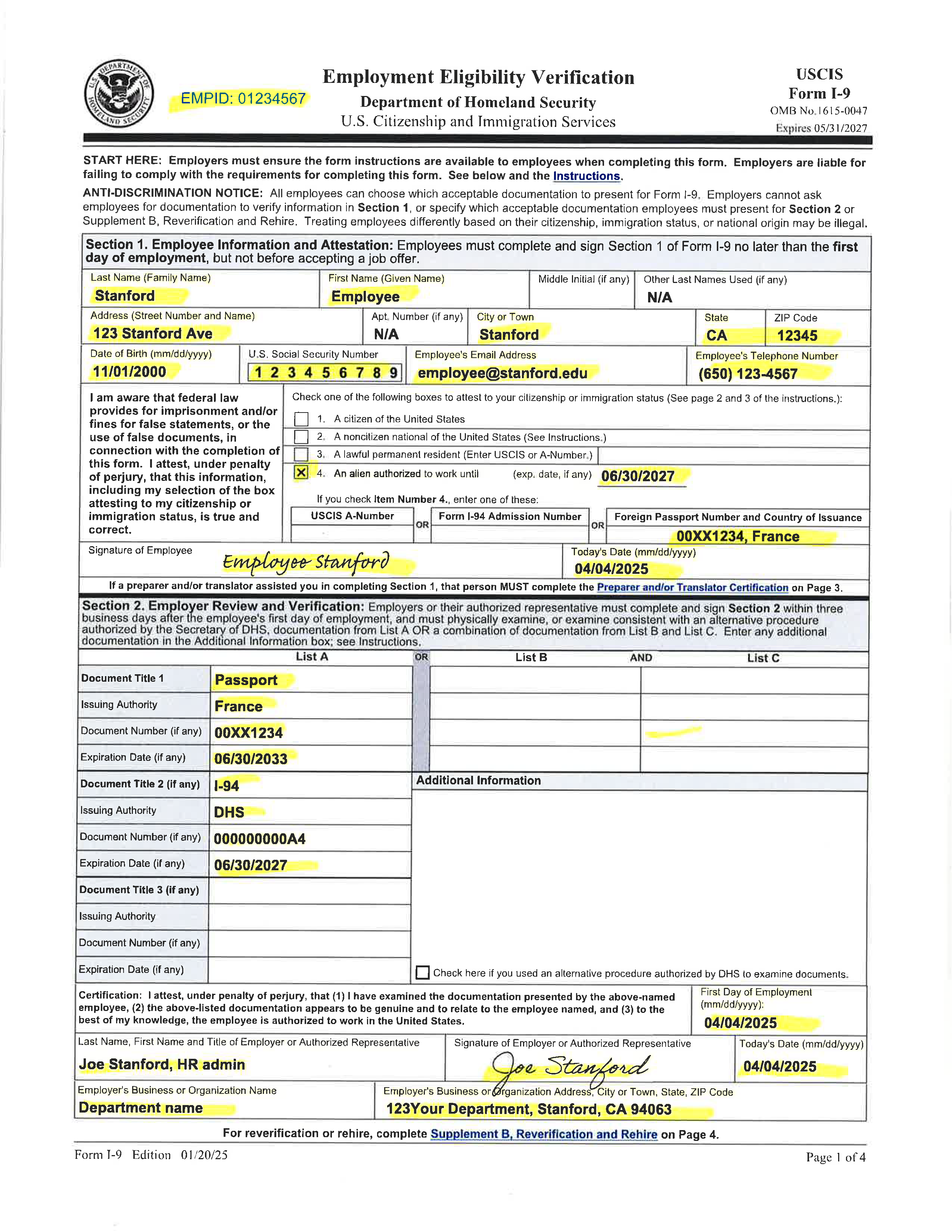 Original documentStructured result
Extract
Pull structured data from unstructured documents.
Define schemas with field names and types; DocLD extracts values from invoices, forms, contracts, and other documents. Zero-shot extraction means no training on your documents — the LLM extracts directly from content using your schema and instructions.
Results include field values, per-field and overall confidence scores, and citations showing where each value was found (text, page, coordinates). Use prebuilt schemas for common document types or build custom schemas for your domain.
Schemas & fields
Custom or prebuilt — define what to extract.
Custom schemas specify field names, types (string, number, date, etc.), required flags, and instructions that guide the AI for edge cases. List and create schemas with an API key via GET/POST /api/v1/schemas; full schema CRUD and prebuilt catalogs may also use session routes under /api/extract/schemas when you are signed in. Use schema instructions to clarify ambiguous layouts or multi-format documents.
Prebuilt schemas (e.g. invoice) are ready-to-use; fetch via GET /api/extract/schemas/prebuilt when using session auth, or pick from listed schemas via GET /api/v1/schemas with an API key. Reference by schema_id in POST /api/v1/extract/run.
Run API & streaming
Sync or stream extraction results.
Run extraction with POST /api/v1/extract/run?sync=true and a Bearer API key: pass document_id and schema_id or inline config. Results include field values and confidence. For Server-Sent Events on long documents, use the session-authenticated POST /api/extract/run (e.g. from the dashboard) with stream=1.
Schema can be referenced by ID (your custom schema or a prebuilt like prebuilt:invoice) or sent inline. The API supports both file upload and document references so you can re-extract stored documents without re-uploading.
Batch extraction
Same schema across many documents.
Submit multiple documents with the same schema via POST /api/extract/batch. Each document is extracted and results are returned per document with confidence and citations. List batches with GET /api/extract/batch; get or delete a batch with GET/DELETE /api/extract/batch/:id.
Use the batch comparison endpoint to compare extraction results with ground truth or across runs. Streaming is available for long-running batch jobs so you can consume results as they complete.
Ground truth & corrections
Measure accuracy and improve over time.
Ground truth is human-verified data for sample documents. Set it via POST /api/extract/ground-truth; then run extraction and compare results with POST /api/extract/ground-truth/compare to measure accuracy. Use quality metrics and comparison endpoints to benchmark schemas and catch regressions.
When reviewers correct extraction results, submit corrections via POST /api/extract/corrections. Export correction history or promote corrections to ground truth. GET corrections/history and corrections/export support audit and training workflows.
Confidence & citations
Per-field confidence and source evidence.
Every extracted value comes with a confidence score (0–1). Use per-field confidence to flag low-confidence values for review or validation. Overall extraction confidence helps you decide whether to auto-approve or send to human review.
Citations link each value to its source: source text, page number, and optional bounding box coordinates. Output is JSON with field_results (or equivalent) including value, confidence, and citation. Use this for audit trails and to improve schema instructions when extraction is wrong.
Schemas & field types
| Aspect | Description |
|---|---|
| Custom schemas | GET/POST/PATCH/DELETE /api/extract/schemas; define fields, types (string, number, date, etc.), and instructions. |
| Prebuilt schemas | GET /api/extract/schemas/prebuilt; use categories like invoice; reference by schema_id in run or batch requests. |
| Instructions | Schema-level and per-field instructions guide the AI for edge cases and multi-format documents. |
Run extraction
| Aspect | Details |
|---|---|
| Endpoint | POST /api/v1/extract/run?sync=true |
| Input | document_id or file upload; schema_id (custom or prebuilt, e.g. prebuilt:invoice) or inline config. |
| Mode | Sync (default) for immediate results; use stream=1 for incremental output on long documents. |
Batch extraction
| Endpoint / usage | Description |
|---|---|
| POST /api/extract/batch | Create and run a batch extraction; same schema across documents. |
| GET /api/extract/batch | List all batch extractions. |
| GET/DELETE /api/extract/batch/:id | Get batch details and results, or delete a batch. |
| GET /api/extract/batch/:id/stream | Stream batch results as they complete. |
| GET /api/extract/batch/:id/comparison | Get comparison data (e.g. vs ground truth). |
Prebuilt schemas
| Aspect | Description |
|---|---|
| Endpoint | GET /api/extract/schemas/prebuilt?category=invoice (optional filter) |
| Usage | Use returned schema_id (e.g. prebuilt:invoice) in POST /api/v1/extract/run?sync=true or batch. |
| Categories | Common types such as invoice; check API or docs for full list. |
Ground truth & quality
| Feature | Description |
|---|---|
| Ground truth | GET/POST/DELETE /api/extract/ground-truth; set verified values per document. |
| Compare | POST /api/extract/ground-truth/compare — compare extraction output to ground truth. |
| Corrections | POST /api/extract/corrections to add; GET history, GET export by extraction_id or document_id. |
| Quality metrics | GET /api/extract/quality-metrics and compare endpoint for schema benchmarking. |
Confidence & citations
| Aspect | Description |
|---|---|
| Per-field confidence | 0–1 score per extracted field; use to flag low-confidence values for review. |
| Overall confidence | Aggregate score for the extraction; helps decide auto-approve vs human review. |
| Citations | Source text, page number, optional bounding box linking value to document location. |
| Output | JSON with field_results (value, confidence, citation) and structured data. |
Page usage & pricing
| Tier | Rate |
|---|---|
| Free tier | 200 pages/month included |
| Overage | $0.05 per page |
Extract: Questions & Answers
Ready to extract structured data?
Get started with the Extract API in minutes. Sign up for free or read the full guide for schemas, batch extraction, and ground truth.